Run Vara Validator
Validators are essential contributors to a successful blockchain network. When chosen to be part of a validator set, they help produce blocks and receive rewards for their contributions to the platform.
Holding such responsibility requires careful commitment from each validator because of personal and nominator stakes that may be at risk; however, working as a network validator is also highly rewarding!
Check out the Vara Validators Dashboard that provides statistical information about the existing validators, including their status, installed node version, hardware details, staking info, slashing history, and more.
Hardware Requirements
Infrastructure for Beginners
The recommended way for beginners to set up a validator is using a Linux-based cloud server (VPS).
Choose a provider that meets the hardware requirements below to ensure optimal performance and security.
OS:Ubuntu 22.04+ (or any distribution with GLIBC 2.35+)CPU:2vCPUs @ 3.4GHz (Intel Ice Lake or equivalent)Memory:8GB RAMStorage:minimum 80GB SSD storage. Should be increased as the blockchain grows.
Initial Set Up
Install Vara Node
Download the latest stable release of the gear node from the builds repo and unpack (choose the binary according to your host operating system):
Terminal:
curl https://get.gear.rs/gear-v1.9.2-x86_64-unknown-linux-gnu.tar.xz | tar xJor
Linux x86-64: gear-v1.9.2-x86_64-unknown-linux-gnu.tar.xz
Run the node:
❯ ./gear --version
gear 1.9.2-5ef221109b8
Terminal:
curl https://get.gear.rs/gear-v1.9.2-aarch64-apple-darwin.tar.xz | tar xJor
macOS ARM: gear-v1.9.2-aarch64-apple-darwin.tar.xz
Run the node:
❯ ./gear --version
gear 1.9.2-5ef221109b8
Terminal:
curl https://get.gear.rs/gear-v1.9.2-x86_64-apple-darwin.tar.xz | tar xJor
macOS Intel x64: gear-v1.9.2-x86_64-apple-darwin.tar.xz
Run the node:
❯ ./gear --version
gear 1.9.2-5ef221109b8
Generate a node key
Generate a unique libp2p secret key at the default path, which determines the Peer ID of the node in the p2p network.
gear key generate-node-key --default-base-path --chain varaRunning the command won't overwrite existing keys. If no existing key is found, it will print the path to the generated secret key along with the Peer ID. Example:
Generating key in "$HOME/.local/share/gear/chains/vara_network/network/secret_ed25519"
12D3KooWFmqMyz4fNHcm9X38rvZsSQ8RMt4K4vsWU7EJEiGZSkFz
You only need to back up the secret key if you want to preserve the Peer ID during migration. Never reuse the same key across nodes, as each node requires a unique Peer ID.
Run Vara Node as a Service
Copy the gear executable to the /usr/bin directory:
sudo cp gear /usr/binTo run the Vara node as one of the Linux services, you need to configure the systemd file:
cd /etc/systemd/system
sudo nano vara-node.service
Configure and save:
[Unit]
Description=Vara Node
After=network.target

[Service]
Type=simple
User=root
Group=root

ExecStart=/usr/bin/gear \
    --chain vara  \
    --rpc-cors all \
    --name "VALIDATOR_NAME" \
    --telemetry-url "wss://telemetry.rs/submit 1" \
    --validator
Restart=always
RestartSec=3
LimitNOFILE=10000

[Install]
WantedBy=multi-user.target
Service Configuration Details
The ExecStart directive points to the gear binary location (default: /usr/bin).
Security Note: This example is configured to run the service as the root user. For production environments, it is recommended to use a dedicated non-privileged user.
Save & Exit. That’s it. Now we can start the service.
sudo systemctl start vara-node.serviceSyncing the Blockchain
If you follow all the instructions, the node will require time to synchronize with the blockchain. To check the service status in real time use:
sudo journalctl --follow -u vara-node.serviceYou can also see your running node in telemetry portal: https://telemetry.rs
Create Stash and Controller Accounts
Create two accounts: Stash and Controller, for security reasons. Ensure each of them has enough funds to pay the transaction fee. Store most of the funds on the Stash accounts, which are the optimal location for saving staking funds safely and securely.
Use the prompt to generate a new seed phrase:
./gear key generate --network varaSeed Phrase Security
Save both seed phrases in a secure, offline place.
If you already have a seed phrase and want to use it, skip this step. You can manage your accounts via Polkadot.{js} Apps or the Polkadot Extension.
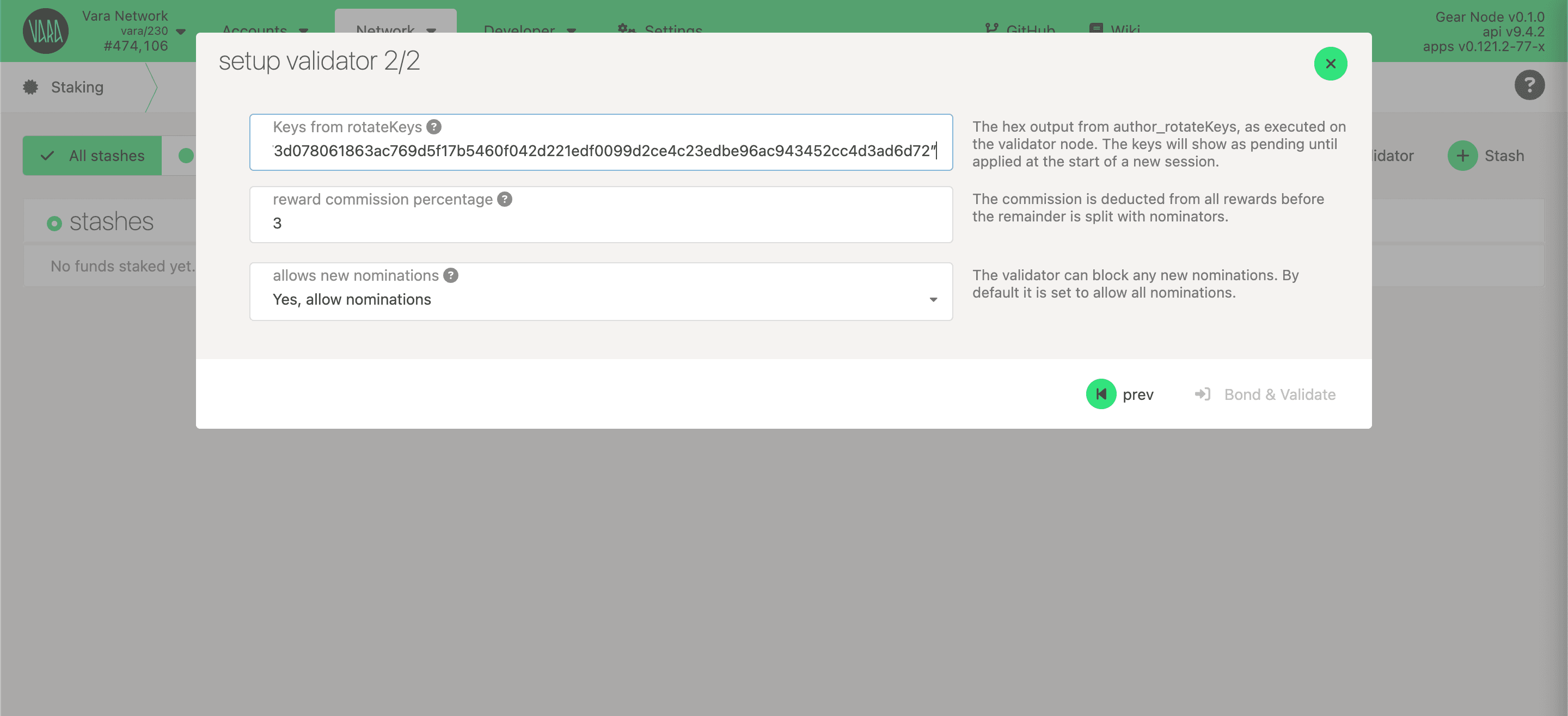
Get Session Keys
You need to tell the chain your Session keys. If you are on a remote server, it is easier to run this command on the same machine (while the node is running with the default HTTP RPC port configured):
curl -H "Content-Type: application/json" -d '{"id":1, "jsonrpc":"2.0", "method": "author_rotateKeys", "params":[]}' http://localhost:9944Output:
{“jsonrpc”:”2.0",”result”:”0x5e977ddcc0c69a6aed067052d5bd8f6bd365fae03562fd447d434e9814ac415d7c9ffe722364922bda314e44654f5c0cdc00d152470d5433f12cb73d078061863ac769d5f17b5460f042d221edf0099d2ce4c23edbe96ac943452cc4d3ad6d72”,”id”:1}The output will have a hex-encoded result field. Copy and save it!
Setup Validator
Once your node is live, synchronized, and appears in telemetry, and session keys are prepared, it's time to set up the validator.
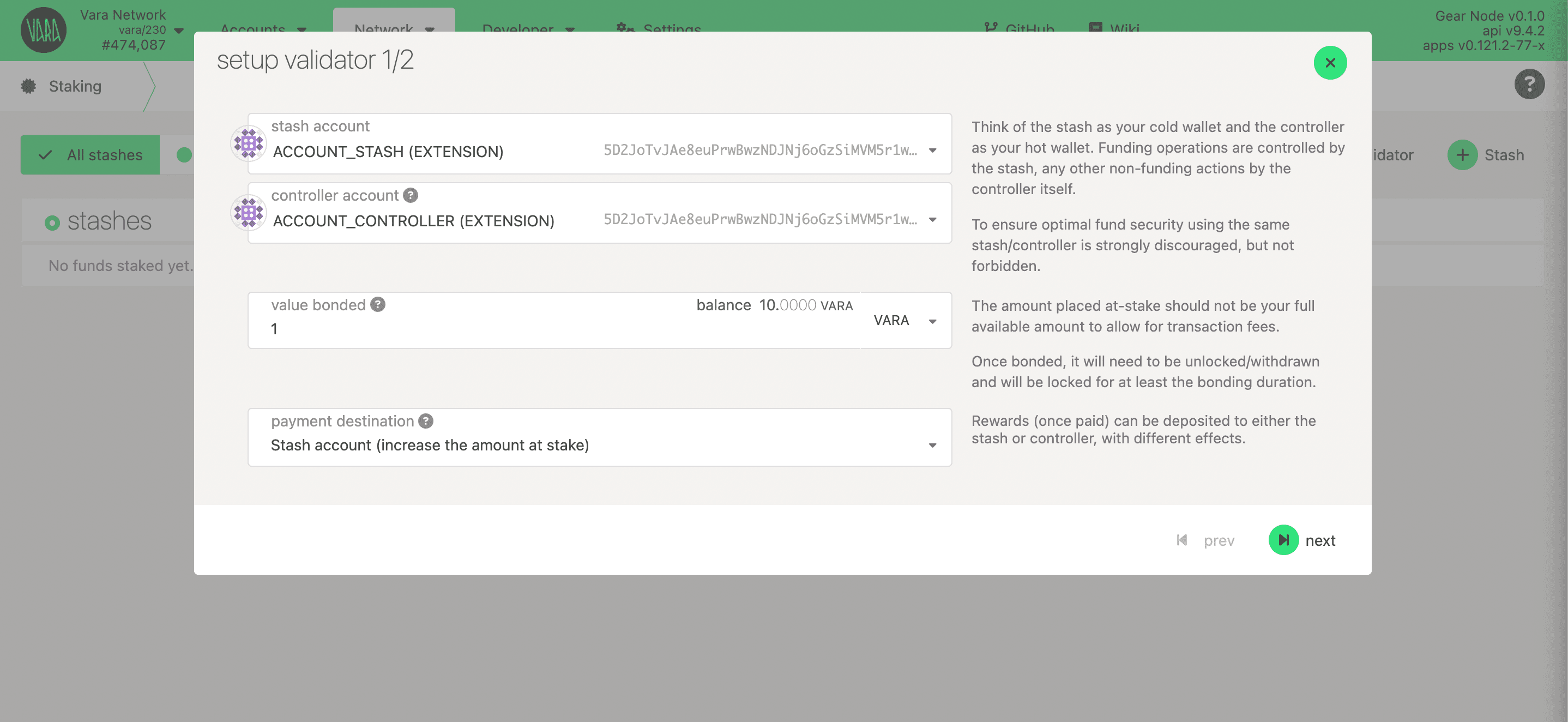
Go to Polkadot.{js} app and navigate to Network → Staking → Account actions section and click +Validator:
Choose your stash and controller accounts and specify your stake amount. It's recommended to utilize distinct accounts both stash and controller.
Minimum Self-Stake
The minimum self-stake required to become an active validator is currently 100,000 VARA.
Please note that this threshold is dynamic and may change over time based on network governance.
Set the session key and reward commission.
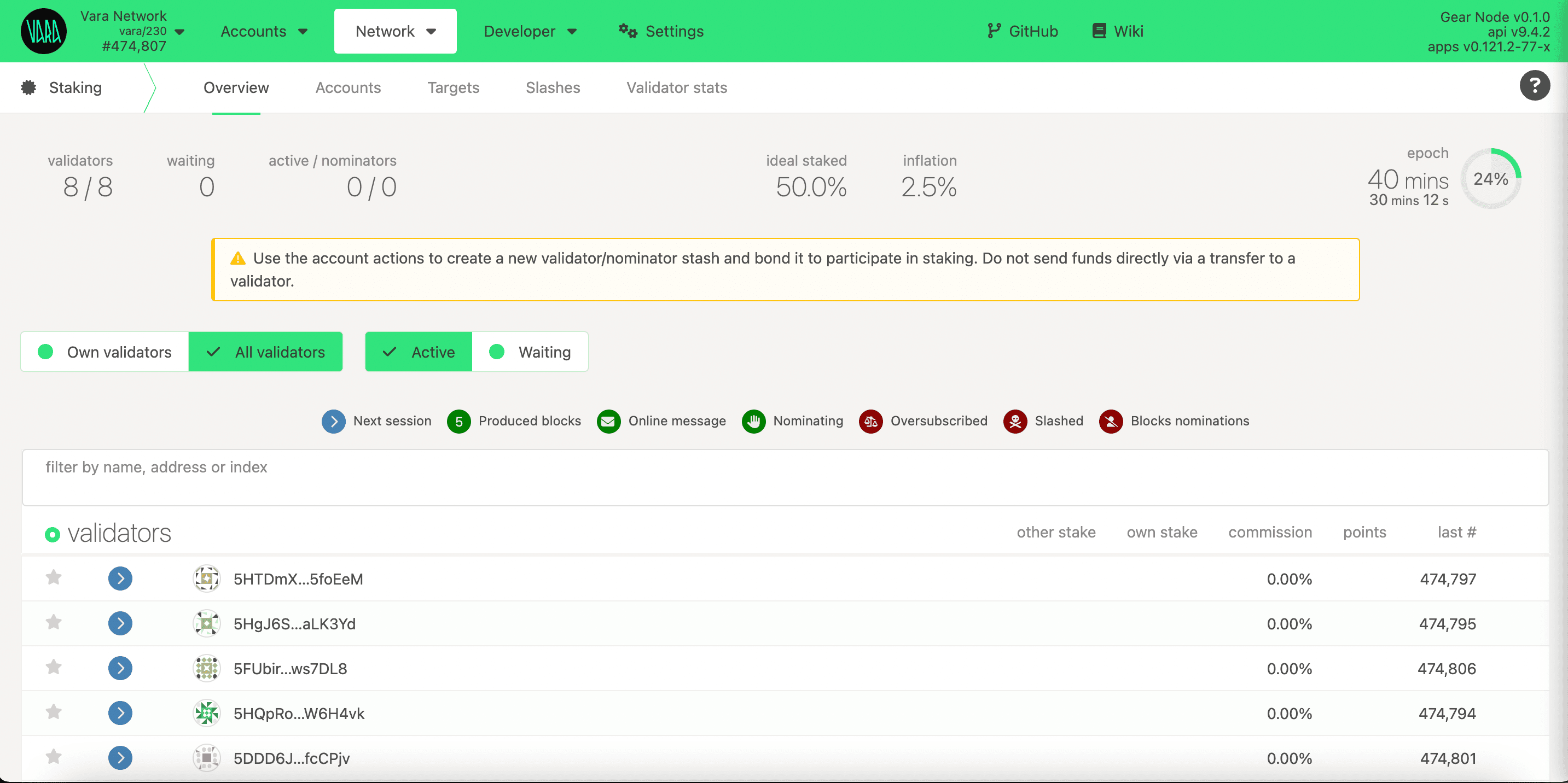
Sign the transaction. Ensure you're added to the stash account and wait for the next Era to start. Once it begins, the network will add your validator.
Update Validator
Regularly updating your validator is critical for keeping up with current maintenance requirements.
The fastest and simplest way to update the validator:
- Download the latest binary version
- Swap binaries
- Restart your service
sudo systemctl start vara-node.service👏👏👏 Congratulations! You’ve successfully set up your validator node. 👏👏👏 If you encounter challenges or need help — reach out in the Validators Chat!
Using Snapshots to Speed Up Node Sync
When initializing your Vara validator node, syncing from the genesis block can be slow — especially on machines with limited I/O or bandwidth. To accelerate the setup, Vara provides regularly updated snapshots of the blockchain state.
Snapshots allow your node to start from a recent block instead of syncing the entire history, reducing setup time from hours to minutes.
📦 Steps to Use a Snapshot
- Stop the node (if already running).
- Download and extract the latest snapshot:
curl -o - -L https://snapshots.vara-network.io/vara-mainnet-latest.tar.lz4
  | lz4 -c -d -
| tar -x -C /home/ubuntu/gear-data/chains/vara_network/db- Restart your node:
gear --chain vara --base-path /home/ubuntu/gear-data/ --database rocksdb --pruning 256📌 Note: Always use snapshots from the official Vara source to ensure trust and integrity: https://snapshots.vara.network.